
What Is CSS?
- 1e Describe the purpose and use of CSS in developing web content (CLO 1)
Introduction To CSS
CSS (Cascading Style Sheets) is the language used to control how a web page looks. If HTML is the content and structure of a page, CSS is the design and personality.
Without CSS, every website would look pretty plain, as you can only control so much of a document's presentation within HTML tags. CSS lets you change colors, fonts, spacing, and layout so that your pages reflect your brand, your personality, or your project's purpose.
How Browsers Work with CSS
Every web browser (like Chrome or Firefox) starts by applying its own default styles to HTML - headings are bold and large, paragraphs have spacing, links are blue and underlined.
When you add CSS, your styles override those defaults. This is why CSS is called cascading - newer or more specific rules "flow down" and replace older or broader ones.
The Building Blocks of CSS
CSS works by applying rules to HTML elements. Each rule targets certain tags and tells the browser how to display them. For example:
h1 {
  color: red;
  font-size: 2em;
}
Let's break that down:
h1→ the selector (chooses which HTML element to style - the <h1> element){ }→ curly braces hold the rulecolor: red;→ a property (color) and a value (red)font-size: 2em;→ another property-value pair, controlling the text size
So this rule tells the browser, "Make every <h1> on the page large and red". You can add as many rules as you like to style different parts of your page.
Example: Applying CSS to HTML
Here's a simple HTML page and a matching CSS stylesheet. Copy the HTML into the HTML window of Playground, and copy the CSS portion into the CSS window.:
HTML
<h1>CSS is cool</h1>
<p>You can change colors, fonts, and layouts.</p>
CSS
h1 {
  color: purple;
  text-align: center;
}
p {
  color: darkblue;
  background-color: lightyellow;
  padding: 10px;
}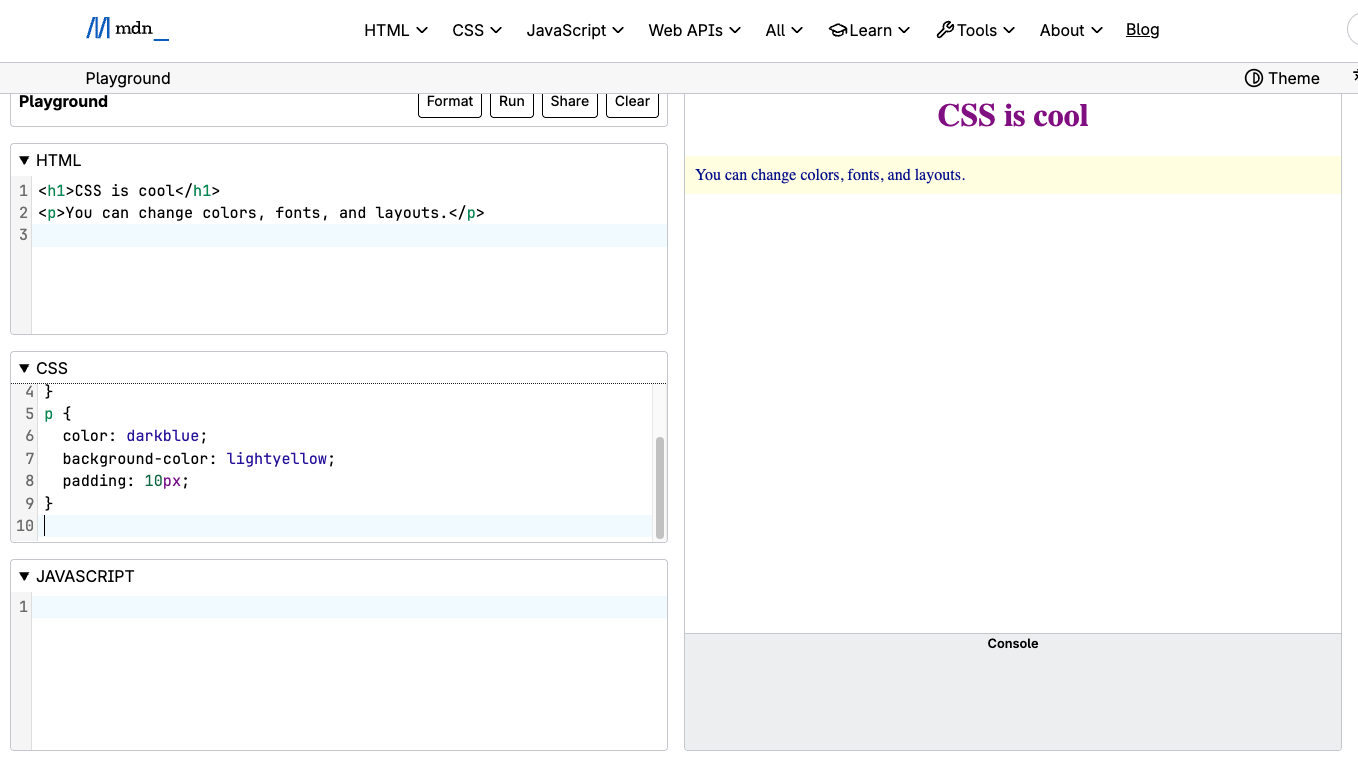
Pretty cool, huh! Did the following happen for you:
- The heading turns purple and is centered.
- The paragraph text becomes dark blue with a soft yellow background and space (padding) around it.
Each CSS rule applies automatically to all elements that match the selector - in this case, every <h1> and <p> on the page.
Why CSS Is "Cascading" and What You Can Do With It
When multiple rules apply to the same element, CSS follows a hierarchy of priorities called a cascade, and it works like this:
- Inline styles (written directly in the HTML) override all others.
- Internal styles (inside the
<style>tag) come next. - External stylesheets (linked
.cssfiles) apply last unless overridden by more specific selectors.
This layered design helps CSS stay flexible and modular. CSS controls nearly everything about how a page looks and behaves visually:
- Text styling: color, font, size, spacing, shadows
- Page layout: columns, grids, and positioning
- Backgrounds and borders: color, images, gradients, rounded corners
- Animation and transitions: smooth effects that bring pages to life
We'll start small, but even the simplest CSS gives your pages an immediate visual upgrade. If you want to dive deeper into some beginning CSS examples, we recommend this article https://developer.mozilla.org/en-US/docs/Learn_web_development/Core/Styling_basics/What_is_CSS
Source: Khalil Abdullah and Saylor University
 This work is licensed under a Creative Commons Attribution 4.0 License.