
CSS Layout
- 3a Discuss how CSS can enhance webpage presentation, user experience, readability, and accessibility (CLO 1)
- 3b Describe the role of CSS in web development, including its syntax, application methods, and fundamental styling principles (CLO 2)
What Have We Learned About CSS So Far?
Up to this point, you've already been using CSS conceptually - even if you haven't written much of it yet.
Here's what you should understand about CSS so far:
- CSS controls presentation, not content. HTML defines what the content is (headings, paragraphs, lists, sections). CSS defines how that content looks (color, font, spacing, alignment, layout).
- CSS works by targeting HTML elements. Styles are applied by selecting elements (such as headings, paragraphs, or sections) and assigning visual rules to them.
- Styles can be reused and applied consistently. A single CSS rule can affect many elements across a page - or across an entire site - making your design easier to manage and update.
- CSS helps pages adapt visually. Even at a basic level, CSS allows content to be more readable and organized, and later you'll use it to help pages adapt to different screen sizes.
- HTML still comes first. CSS does nothing on its own - it only works because HTML provides a clear, structured document to style.
So far, you've focused on building clean, well-structured HTML. That foundation is critical - good CSS depends on good HTML.
Next, we'll look more closely at how CSS and HTML work together, and how styles are actually connected to and applied across a webpage.
How CSS and HTML Work Together
When a browser loads your webpage, it first reads your HTML to understand the content. Then it looks for CSS rules that tell it how that content should appear. You can include CSS in three ways:
1. External stylesheet – the most common method. <link rel="stylesheet" href="style.css">
This line goes inside the <head> of your HTML and points to a separate CSS file.
2. Internal stylesheet – CSS inside a <style> tag in the <head>. <style>
  body { font-family: Arial, sans-serif; }
</style>
3. Inline styles – CSS directly inside an element (not recommended for large projects). <p style="color:blue;">This is blue text.</p>
The Anatomy of a CSS Rule
A CSS rule tells the browser what to style and how. Example:
p {
  color: darkslategray;
  font-size: 1.1rem;
}
- Selector (
p) – which element(s) to style. - Property (
color,font-size) – the aspect you want to change. - Value (
darkslategray,1.1rem) – how you want that property to appear.
Together, a property and value form a declaration, and the entire block is a rule.
Try It Now (MDN Playground)
Open a new tab at MDN Playground. Paste the following code and click Run.
HTML
<h1>Welcome to my first styled page</h1>
<p>CSS helps make the web beautiful.</p>
CSS
h1 {
  color: teal;
  text-align: center;
}

p {
  color: gray;
  font-size: 1.1em;
  line-height: 1.5;
}
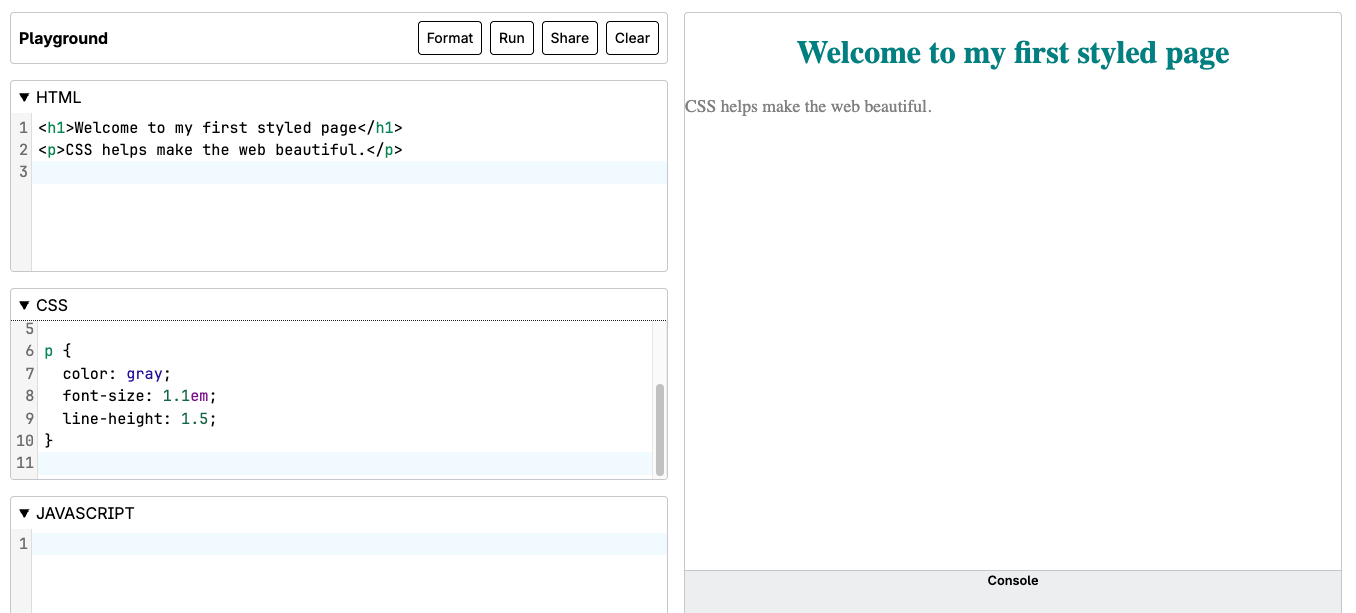
Experiment:
- Change
tealto another color name or hex code (e.g.,#cc5500). In subunit 3.3, we will talk more about hex code. Briefly, A hex code is a six-digit alphanumeric string (starting with a #) that represents specific levels of red, green, and blue to define a precise color in HTML and CSS. - Add
background-color: lightyellow;to thebodyand re-run. - Notice how simple changes affect readability and mood.
Why CSS Matters
CSS isn't just about looks - it's about usability:
- Accessibility: proper color contrast and readable text sizes help everyone.
- Consistency: shared styles make all pages feel part of the same site.
- Efficiency: one stylesheet can style many pages, so you only update once.
- Responsiveness: CSS layouts adjust content for phones, tablets, and desktops.
Quick Review
| Concept | Description |
|---|---|
| CSS Rule | Defines how selected HTML elements appear |
| Selector | Targets one or more HTML elements |
| Property | Visual feature to modify (color, size, spacing) |
| Value | Specific setting for that property |
| Stylesheet | File or section that stores CSS rules |
| Cascading | When multiple rules apply, the browser decides which one "wins" |
Table with two columns, Concept and Description, defining six key CSS terms: CSS Rule, Selector, Property, Value, Stylesheet, and Cascading.
Reflection
- How does CSS separate content from design?
- Why might a single external stylesheet be better than repeating inline styles?
- Think of a website you like - what role might CSS have played in making it engaging and easy to use?
For more practice, see https://developer.mozilla.org/en-US/docs/Learn_web_development/Core/CSS_layout
Source: Khalil Abdullah and Saylor University This work is licensed under a Creative Commons Attribution 4.0 License.
Source: Christopher Stein
This work is licensed under a Creative Commons Attribution 4.0 License.