
A Systematic Approach to CSS
- 6b Apply CSS properties, selectors, and layout techniques to control the style and structure of webpages (CLO 6)
Overview
Up to this point, you've learned individual pieces of CSS - selectors, properties, layout tools, and accessibility best practices. In this section, you'll bring those pieces together and start thinking about CSS as a system rather than a collection of rules.
CSS works best when it's intentional, consistent, and reusable. Instead of asking "How do I style this one thing, then this thing, then that thing?", you'll begin asking "How should my site behave as a whole?" or "How do I perceive this one element as being part of a group of similar elements, and then style them all?" This shift in thinking is what separates beginner styling from real-world front-end development.
What Does "CSS as a System" Mean?
CSS is not just about changing colors or fonts. It's a coordinated system that controls:
- Visual identity – color, typography (the art and technique of presenting text so it is legible, readable, and appealing), and spacing
- Structure – layout and alignment (how content is arranged and positioned on the page)
- Consistency – shared styles and reusable rules (so multiple pages look and feel like the same site)
- Responsiveness – adaptability across devices (how the layout adjusts for different screen sizes)
- Maintainability – organization and reuse (making styles easier to update and manage over time)
A well-designed CSS system allows you to make efficient global changes while keeping styles consistent across multiple pages. Implementing CSS as a system means avoiding duplication of work and conflicting code. It also, very importantly, allows you to scale your projects intentionally and efficiently as they grow. This is especially important for your portfolio, which includes multiple pages that should feel like part of the same site.
The Core Building Blocks of a CSS System
1. Selectors: Choosing What Gets Styled
Selectors define where styles apply. In a system-based approach, selectors are chosen carefully to avoid repetition and confusion. Common selector types you'll use together:
- Element selectors (
body,h1,p) - Class selectors (
.card,.section,.nav-link) - Contextual selectors (
nav a,.projects h2)
Rather than styling each element individually, you'll group related elements using classes and shared structure.
2. Properties: Defining Visual Rules
Properties define how elements look and behave. In a CSS system, properties are reused intentionally. Common system-level properties include:
- Typography (font-family, font-size, line-height)
- Color (text color, backgrounds, borders)
- Spacing (margin, padding)
- Alignment and layout (display, gap, justify-content)
Instead of redefining styles repeatedly, you establish patterns that apply across your site.
3. Layout: Controlling Structure and Flow
Layout tools control how content is arranged on the page. In this course, your CSS system will rely on:
- Normal flow for readable structure
- Flexbox for alignment and simple layouts
- Grid (lightly) for structured sections when appropriate
Layout decisions should support 1) A clear hierarchy; 2) Readability / Accessibility; 3) Responsive behavior to adapt to a wide range of devices. Your layout choices should feel intentional, not accidental.
Thinking Systemically: From Page Styling to Site Styling
Here's the mindset shift: Instead of thinking "I'll style this page" and then having to style page after page, section after section, element after element, we've shifted to systematic thinking, "I'll define styles that work across the site". Instead of writing CSS only for one page, you'll:
- Define base styles in
body - Reuse shared classes across pages
- Apply layout rules consistently
- Let HTML structure and semantics do as much work as possible
This approach reduces complexity and improves accessibility and maintainability.
Early Practice: Seeing CSS as a System
Open your Playground and experiment with a simple structure like this:
<body>
  <header class="site-header">
    <h1>My Portfolio</h1>
  </header>

  <main class="content">
    <section class="card">
      <h2>Project One</h2>
      <p>Description goes here.</p>
    </section>

    <section class="card">
      <h2>Project Two</h2>
      <p>Description goes here.</p>
    </section>
  </main>
</body>
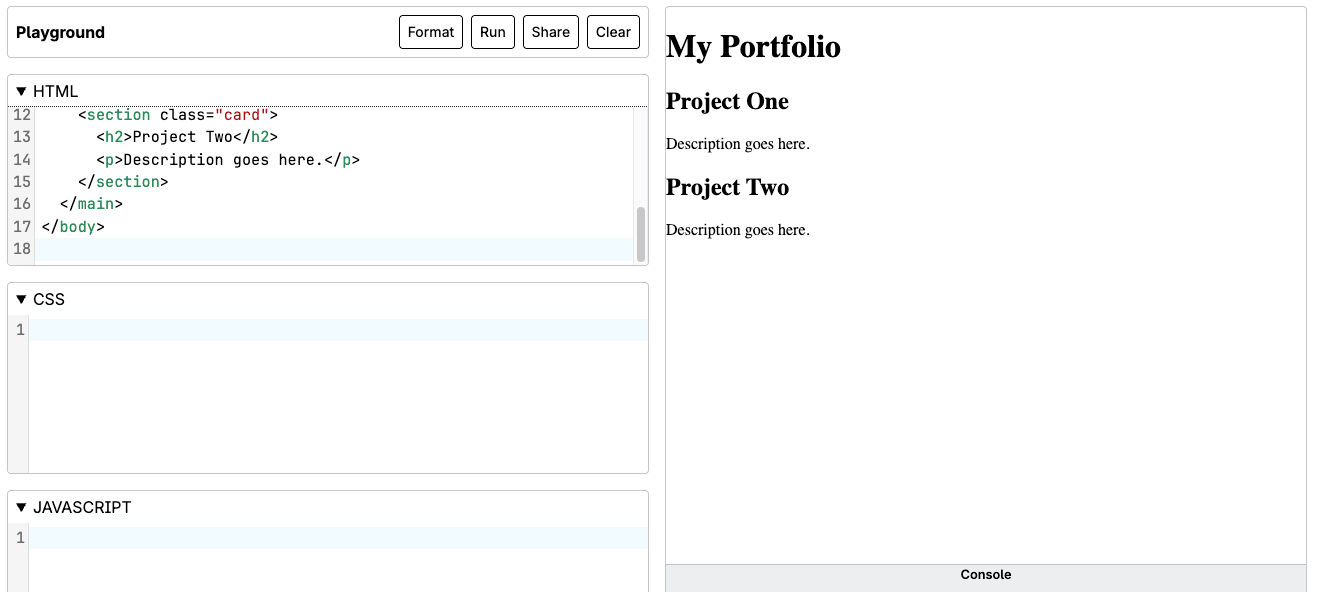
Now apply CSS that:
- Sets global typography on
body - Uses a shared
.cardclass for layout and spacing - Keeps styles consistent across both sections
Notice how one rule affects multiple elements - that's CSS working as a system.
Why This Matters for Your Portfolio
Your portfolio isn't just a collection of pages - it's a single site with a unified identity. Thinking in terms of systems allows you to:
- Style once, reuse everywhere
- Keep pages visually consistent
- Make updates efficiently
- Prepare your project for future growth
Source: Khalil Abdullah and Saylor University
 This work is licensed under a Creative Commons Attribution 4.0 License.